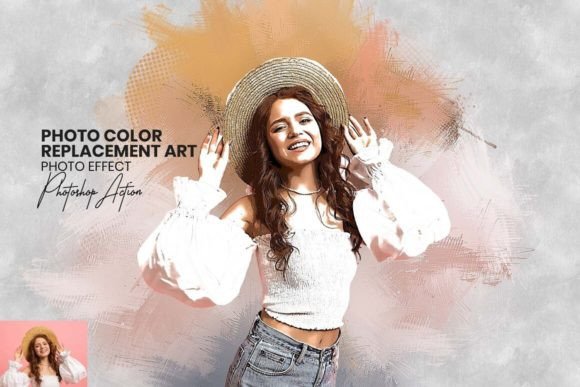
Transform Your Photos with Photo Color Replacement Art
Every photographer, designer, and content creator hits that familiar wall. You have a perfectly composed image, but the colors feel flat, the mood is off, or the subject just doesn’t pop against the background. Traditional editing can mean hours of tedious masking and manual adjustments. There’s a smarter way to work. Our Photo Color Replacement Art Photoshop Action is a revolutionary tool designed to bridge the gap between a standard photo and a stunning digital painting, all while giving you unprecedented control over color and composition. It’s not just a filter; it’s a comprehensive creative suite that transforms your workflow.
A Seamless Blend of Digital Painting and Precision Editing
At its core, this action performs a sophisticated transformation. With a single click, it analyzes your photograph and applies a complex algorithm that mimics the delicate, layered strokes of traditional watercolor techniques. The result is a high-definition finish that retains the detail of your original image but imbues it with an artistic, hand-painted quality. The visual personality is soft yet vibrant, with a texture that adds depth and a human touch to digital work. This style moves your projects away from sterile perfection and toward a more authentic, engaging aesthetic that resonates with audiences.
What sets this tool apart is its dual functionality. Beyond the initial artistic conversion, the Photo Color Replacement Art action includes robust color grading and background editing capabilities. You can seamlessly swap color palettes to match brand guidelines, alter the season in a landscape, or completely change the emotional tone of a portrait. The included brush and pattern files allow for further customization, letting you add subtle texture overlays or refine edges with precision. This integration means you’re not just applying an effect; you’re engaging in a non-destructive editing process that puts you in full creative command.
Practical Applications for Modern Creators
The true value of any design asset lies in its versatility. This action is engineered for a wide range of real-world projects. For graphic designers, it’s a game-changer for creating unique hero images for websites, compelling blog post graphics, and standout social media content. Imagine transforming a product photo into a beautiful watercolor-style illustration for an artisanal brand’s packaging design. The effect adds a handcrafted, premium feel that stock photos simply cannot achieve.
For marketers and entrepreneurs, consistent visual identity is key. Use the action to develop a signature style for all your digital marketing assets. Apply it to team headshots for a cohesive “About Us” page, or create a series of illustrated social media posts that instantly recognizable. The tool’s ease of use is a major advantage for small business owners who may not have deep technical expertise but need professional-grade results. The step-by-step video tutorials and well-documented instructions ensure a smooth learning curve.
Bloggers, publishers, and content creators will find it invaluable for enhancing editorial design. Turn a standard travel photo into a captivating watercolor for a blog header, or give recipe images a soft, appetizing glow. For personal projects, it offers a fantastic way to turn family photos into unique pieces of wall art or to create custom stationery. The action handles various file formats and is built for efficiency, saving you valuable time in your production pipeline.
Integrating the Action into Your Design Workflow
Adopting a new tool should simplify your process, not complicate it. Begin by evaluating the visual style of the Photo Color Replacement Art against your project’s goals. It excels where a soft, artistic, and slightly textured aesthetic is desired. It may not be the ideal choice for ultra-modern, minimalist designs that rely on sharp, geometric lines. Test it on a sample image that represents your typical work. Observe how the watercolor effect interacts with fine details, text, and your existing brand colors.
Consider how the transformed image will function within your broader design. A watercolor background might pair beautifully with a clean, sans serif font for a modern yet approachable look. Alternatively, you could use the effect on a central image and surround it with a serif font to create a classic, editorial layout. The key is in the font pairing and layout balance. The action’s output is a high-resolution file, making it suitable for both web design and high-quality print projects.
From a practical standpoint, the included files are organized for ease of use. The .atn (action), .abr (brush), and .pat (pattern) files are industry-standard formats for Adobe Photoshop. The 20+ unique color adjustments give you immediate variation without starting from scratch. Always work on a duplicate layer to preserve your original photo. This non-destructive approach is a hallmark of professional modern typography and design workflows, ensuring you can always backtrack or experiment freely.
Achieving Consistency and Professional Polish
One of the greatest challenges in any series of creative work is maintaining visual consistency. This action helps establish a recognizable style that can become part of your brand identity. By applying the same artistic treatment across a campaign, a book’s interior illustrations, or a product line, you create a cohesive visual language. This consistency builds audience recognition and conveys a level of professionalism and attention to detail.
The tool’s ability to act as a creative font for your images—adding personality and voice—should not be underestimated. In a crowded digital landscape, distinctive imagery helps you stand out. Whether you’re designing a logo, creating packaging design, or crafting social media graphics, the Photo Color Replacement Art action provides a powerful way to inject originality into your work. It’s a premium design asset that unlocks new creative possibilities, allowing you to deliver polished, engaging, and memorable visual content efficiently.